Topic: Thread Icons | How Do You Change Them?

Hey guys, you've all been helping me out a lot getting my forum together.

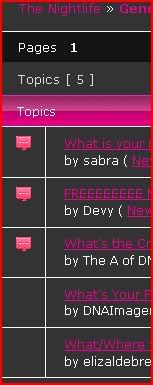
I got to the next roadblock which is those little icons in front of threads.  Wondering where I can config them.  I've got icons ready to drop in.

http://i198.photobucket.com/albums/aa181/eosloung/Capture22.jpg

Re: Thread Icons | How Do You Change Them?

/* Status indicators
----------------------------------------------------------------*/

.brd .main-content .main-item .icon {
    border-color: #EDF1F5 #DDE0E4 #C6CBD3 #BABFC6;
    }

.brd .main-content .redirect .icon {
    border-color: #f4f4f4 #f4f4f4 #f4f4f4 #f4f4f4;
    }

.brd .main-content .sticky .icon {
    border-color: #D7E5F3 #C3CFDC #9FB3C7 #90A2B4;
    }

.brd .main-content .closed .icon {
    border-color: #ACACAC #979797 #898989 #7A7A7A;
    }

.brd .main-content .sticky .closed .icon {
    border-color: #D7E5F3 #C3CFDC #898989 #7A7A7A;
    }

.brd .main-content .new .icon {
    border-color: #2B75AD #235E8C #1F537B #266799;
    }


you need to change them ... use background img to include yours, maybe...
wher? in    yourstlye_cs
Re: Thread Icons | How Do You Change Them?

.brd .main-content .sticky .icon {
background-image:url('http://www.dnaimagery.com/sbnightlife/forum/img/sticki.gif');
}

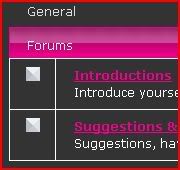
Is that correct? b/c for some reason it's not showing.

http://forums.sbnightlife.com/viewforum.php?id=22

Thanks for all your help.

Last edited by DNAImagery (2009-08-20 23:05:41)

Re: Thread Icons | How Do You Change Them?

background-image:url(/img/sticki.gif);

don't think full url's work...

Re: Thread Icons | How Do You Change Them?

Keydog, do you have a punbb forum? I would like to see it.  You seem to be very knowledgable about it.  I really appreciate the help.

On to the subject at hand,
http://forums.sbnightlife.com/viewforum.php?id=22

It doesn't show on the surface (cache situation?), but when you right click it and say "view image" it shows the correct sticky icon.  Odd or is it working?

Re: Thread Icons | How Do You Change Them?

.brd .main-content .main-item .icon {
    border-width: 0;
    height: 16px;
    width: 16px;
    }

.brd .main-content .main-item .icon {
    background:url(img/your.gif);
    }


try seeing if it shows with the above
then maybe it's down to positioning the gif....

EDIT: yeah to forum but haven't ever done this before big_smile learning with you...

Just tested it here:
http://punbb-b.keydogbb.info/index.php

worked for me....

Last edited by KeyDog (2009-08-20 23:51:03)

Re: Thread Icons | How Do You Change Them?

Nope, that just made them disappear (Moved them out of the square?)

My friend says she sees them, but only on certain pages...

Re: Thread Icons | How Do You Change Them?

just notice in style.css
there's

.brd .main-content .main-item .icon {
    border-style: solid;
    border-width: 0.5833em;
    height: 0;
    width: 0;
    float: left;
    margin-top: 0.667em;
    margin-left: -2.417em;
    }

maybe it needs to be positioned via that?
mine is also only showing because I'm using repeat....

EDIT i see yours too

http://keydogbb.info/img/stick.jpg

Last edited by KeyDog (2009-08-21 00:08:24)

Re: Thread Icons | How Do You Change Them?

I think I have it; put the
/img folder in the style folder
then make sure the
gif you're using is smaller than height width settings  in style_cs.css ... so if your gif is 16 make the width & height 17....

that solved my prob big_smile

Last edited by KeyDog (2009-08-21 00:22:17)

Re: Thread Icons | How Do You Change Them?

Okay, cool.  Working, except for one of them...As you can see the red icon pops up, but then below there is no icon.  Where is that icon located?

http://i198.photobucket.com/albums/aa181/eosloung/Capture44.jpg

Re: Thread Icons | How Do You Change Them?

Looks like the first one on the list

.brd .main-content .main-item .icon {


is missing...

maybe paste your code from /*status indicators here
also make sure image size is correct your linking to....

Re: Thread Icons | How Do You Change Them?

/* Status indicators
----------------------------------------------------------------*/
.brd .main-content .main-item .icon {
    border-width: 0;
    height: 16px;
    width: 16px;
    }
   
.brd .main-content .main-item .icon {   
    background:url(img/komentar.gif);
    }

**Edit**
Right once I posted it I noticed that I had img/komentar.gif and not /img/komentar.gif

All fixed now!  One more roadblock down...how many more to come? gahhh...This is fun though.

Last edited by DNAImagery (2009-08-21 01:06:50)